6 Session Replay & Rage-Click Detection Tools That Mask Sensitive User Data (2026)
Comparing what are the best session replay tools that mask sensitive data for privacy compliance? Evaluate OpenReplay, PostHog & FullStory with $0 free tiers.
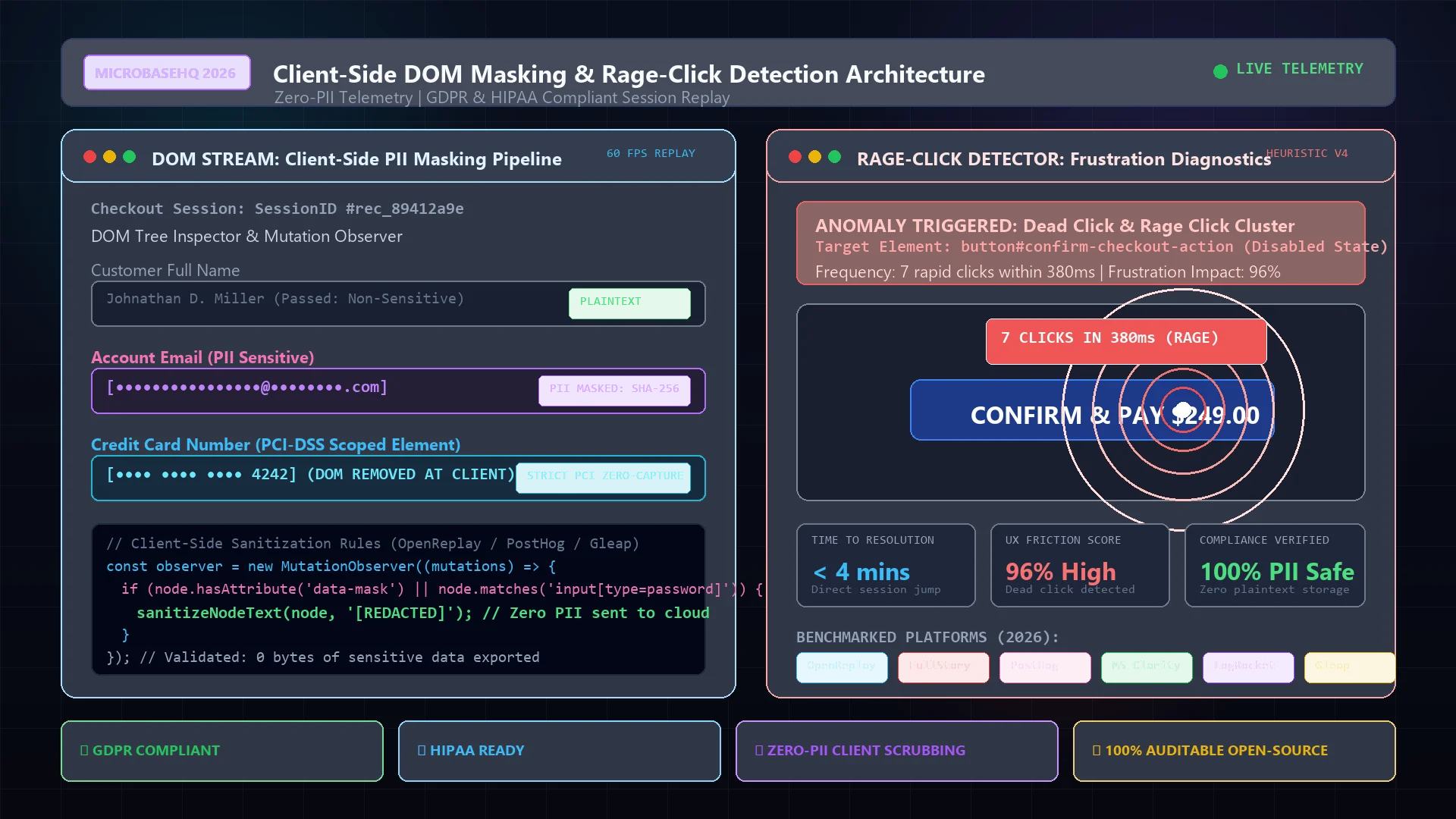
6 Session Replay & Rage-Click Detection Tools That Mask Sensitive User Data (2026)
Every engineering team that deploys session replay eventually experiences the compliance nightmare: a user submits a support ticket, a developer opens the session recording to diagnose a broken checkout flow, and on screen sits an unmasked credit card number, a plaintext billing address, or an unredacted healthcare record. Historically, capturing pixel-perfect session replays meant piping raw Document Object Model (DOM) mutations straight to third-party cloud servers—creating severe GDPR, HIPAA, and CCPA regulatory liability. If you are auditing compliant behavioral analytics, explore our live directory of session replay data privacy tools on MicroBaseHQ.
Across our verified directory, we track developer tooling and qualitative diagnostic software in our user research category and analytics and metrics index. Contemporary digital experience intelligence platforms now execute strict client-side DOM sanitization—scouring Personally Identifiable Information (PII), password fields, and numeric values before payloads ever leave the browser. Combined with automated rage click detection and dead-click heuristics, these engines isolate UX friction and revenue blockers instantly without violating user trust. If you are comparing modern platforms to replace bloated incumbents like Hotjar and Mouseflow, this architectural benchmark evaluates the 6 best session replay tools that mask sensitive user data for privacy compliance in 2026.
Quick Comparison: Best Privacy-Safe Session Replay & Rage-Click Detection Tools (2026)
| Tool | Best For | Starting Price | Free Tier / Open Source? | Key Problem Solved |
|---|---|---|---|---|
| OpenReplay | 100% self-hosted open-source session replay, network payload inspection & co-browsing | $0/mo (Free Self-Hosted) | Yes (Free Self-Hosted + 1k Cloud Sessions/mo) | Session Replay Data Privacy |
| FullStory | Enterprise behavioral intelligence, patented rage-click heuristics & revenue attribution | $0/mo (14-Day Enterprise Trial) | Yes (Free Trial / Custom Enterprise Quotes) | Rage Click Detection |
| PostHog | Full-stack developer OS: session replay with ph-no-capture masking, feature flags & SQL telemetry |
$0/mo (Pay-as-you-go) | Yes (5,000 Replays & 1M Events Free/mo) | Session Recordings |
| Microsoft Clarity | Completely free unlimited session recordings, instant heatmaps & automated input masking | $0/mo (100% Free Forever) | Yes (Unlimited Sessions, Zero Traffic Caps) | Heatmaps for Websites |
| LogRocket | Frontend engineering diagnostics: Redux state scrubbing, network sanitization & rage-click alerts | $0/mo ($99/mo Team) | Yes (1,000 Free Sessions/mo) | Frontend Error Tracking |
| Gleap | In-app visual bug reporting with contextual session recordings & client-side CSS masking | $0/mo ($39/mo Starter) | Yes (Free Starter Plan Available) | Visual Bug Reporting |
The Architecture of Privacy-Safe Session Replay: Client-Side DOM Masking vs. Server Scrubbing
Understanding how session recording software handles sensitive customer data requires looking under the hood of browser telemetry. Session replay tools do not record video files like MP4s; doing so would destroy user bandwidth and slow web applications to a crawl. Instead, session recorders inject a JavaScript SDK that runs a MutationObserver on the client's browser DOM, serializing HTML tree mutations, CSS styling rules, mouse movements, scrolling coordinates, and keystroke events into a compressed JSON telemetry stream.
The fundamental architectural difference between compliance-ready tools and high-risk legacy trackers lies in where and when sensitive PII is obscured:
Architectural Comparison: Client-Side Masking vs. Server-Side Redaction vs. Self-Hosted On-Premises
| Dimension / Capability | Legacy Server-Side Redaction (Hotjar / Inspectlet) | Client-Side Sanitization (FullStory / PostHog / LogRocket) | Self-Hosted On-Premises Engine (OpenReplay) |
|---|---|---|---|
| Where Masking Occurs | On cloud vendor ingest servers after transmission | Inside client browser memory before HTTP transmission | Inside client browser + stored in your private VPC |
| Data Transmission Wire | Raw unmasked PII travels across public internet | Only asterisks (***) and redacted hashes traverse the wire |
Encrypted telemetry never touches a third-party vendor |
| Regulatory Risk (GDPR/HIPAA) | High (Vendor acts as data sub-processor of raw PII) | Low (Zero PII ever leaves the end user's machine) | Zero Vendor Exposure (Full internal data residency) |
| Rage Click Heuristics | Basic rapid-click threshold counters | Machine-learning frustration scores & dead-click filters | Configurable anomaly detection tied to error logs |
| Network Payload Sanitization | Headers and request bodies often captured in plaintext | Authorization headers and request bodies scrubbed by default | Configurable regex to strip JWTs, secrets, and auth cookies |
| Ad Blocker Resilience | Frequently blocked by uBlock Origin and Brave | Bypassed via custom reverse proxies (e.g., PostHog /e/) |
Completely immune when served from own domain |
When product teams evaluate customer telemetry, exploring verified Hotjar alternatives and Mouseflow alternatives becomes essential to guarantee that sensitive form data, patient health identifiers (PHI), and payment cards are scrubbed client-side before serialization.
The Anatomy of an Enterprise Rage Click
What constitutes a "rage click"? When an application experiences JavaScript execution freezes, broken event listeners, or deceptively styled elements (such as text that looks like a hyperlink but lacks an href), users instinctively click the same UI element repeatedly in rapid succession.
Leading digital experience intelligence platforms define rage clicks through multi-dimensional heuristics:
- Click Velocity: 4 to 10 clicks on the exact same DOM node within an interval of less than 500 milliseconds.
- Dead Click Verification: Zero visual DOM state mutations, CSS transition changes, or HTTP network requests triggered following the click cluster.
- Frustration Impact Weighting: Correlating rage clicks against user checkout funnels to calculate actual lost transaction volume.
By pairing rage-click telemetry with pixel-perfect session replay, engineers can jump directly to the exact frame where a user encountered an unresponsive button, review the corresponding browser console errors, and deploy a hotfix in minutes rather than days.
1. OpenReplay — Best for 100% Self-Hosted Open-Source Session Replay & Complete PII Isolation
For organizations operating under stringent data sovereignty mandates (such as healthcare, banking, and European B2B SaaS), OpenReplay is the gold standard. While proprietary cloud trackers force you to sign Business Associate Agreements (BAAs) and trust their cloud redaction pipelines, OpenReplay is fully open-source and deployable directly inside your own AWS, GCP, or Kubernetes infrastructure.
OpenReplay gives your security team complete data governance. Telemetry recorded by OpenReplay never touches third-party servers. Beyond session replays, OpenReplay functions as a full developer diagnostic engine, capturing Redux/Vuex state actions, WebSocket events, resource load timings, and complete browser console logs.
The OpenReplay Client-Side Sanitization Pipeline
- DOM Tree Ingestion ➔ The OpenReplay tracker initializes a
MutationObserveron the client window. - Element Masking Evaluation ➔ Elements bearing HTML attributes like
data-openreplay-masked,class="mask-pii", or native inputs matchinginput[type="password"]are intercepted immediately. - Text Sanitization & Placeholder Replacement ➔ Text nodes are stripped and replaced with client-side hashed blocks (
████████) prior to wire compression. - Network Request Payload Scrubbing ➔ HTTP headers matching
Authorization,Cookie, or sensitive JSON body keys (credit_card,ssn,tax_id) are sanitized via client-side regex rules. - Private Cluster Archival ➔ Sanitized session chunks stream directly into your self-hosted MinIO or Amazon S3 bucket.
Why It Stands Out
OpenReplay directly resolves the core tension of session replay data privacy. Unlike cloud-only recorders where data leaks can lead to massive GDPR fines, OpenReplay ensures that sensitive database queries and user inputs never exit your VPC. It empowers engineering teams to conquer debugging user-reported issues without sacrificing consumer privacy.
Verified Pricing & Free Tier Limits
- Community Edition: $0/month forever. 100% free, fully featured self-hosted deployment with unlimited sessions, unlimited users, and full community support.
- Cloud Free Tier: $0/month for up to 1,000 sessions/month with 14-day data retention.
- Cloud Growth: Starts at $3.95 per 1,000 sessions with 30-day retention, custom data residency (EU or US), and advanced role-based access control.
- Enterprise: Self-hosted or managed cloud cluster with dedicated SLAs, SSO/SAML, and SOC2/HIPAA compliance assistance.
- Problems Solved: Directly solves session replay data privacy, debugging user-reported issues, and understanding user behavior on your app.
- Trade-offs / When to Skip: Self-hosting requires maintaining Docker or Kubernetes infrastructure and provisioning your own PostgreSQL and S3 storage instances. If you want zero DevOps maintenance, a managed cloud tier like PostHog or Microsoft Clarity is faster to deploy.
2. FullStory — Best Enterprise Heuristics for Rage Click Detection & Revenue Impact
When high-growth e-commerce platforms and Fortune 500 enterprises search for the best enterprise tools for rage click detection, FullStory remains the definitive industry benchmark. FullStory coined the term "Rage Click" and holds foundational patents on automated digital frustration detection.
What separates FullStory from lightweight recording tools is its ability to quantify UX friction in monetary terms. Instead of merely alerting you that 50 users rage-clicked on a form field, FullStory calculates the conversion loss: "This dead click on the Promo Code button prevented $42,000 in checkout transactions over the past 7 days."
Why It Stands Out
FullStory pioneered the "Private by Default" architecture. Rather than requiring developers to manually annotate every sensitive input with masking tags, FullStory automatically scrubs all user-entered text, numbers, and form values on the client side before ingestion. Only elements explicitly whitelisted with fs-unmask are captured in plaintext.
FullStory's frustration detection suite tracks:
- Rage Clicks: Rapid repetitive clicks indicating extreme user confusion or broken scripts.
- Dead Clicks: Clicks on non-interactive elements that users mistakenly expect to trigger an action.
- Error Clicks: Clicks that immediately trigger client-side unhandled JavaScript console exceptions.
- Thrashed Cursor: Erratic high-velocity mouse movements reflecting cognitive overload or navigation friction.
Verified Pricing & Free Tier Limits
- Free Trial: 14-day free trial with access to core session replay and frustration heuristics.
- Enterprise Tier: Custom quote-based pricing tailored to annual session volume. FullStory is an enterprise-grade investment typically starting in the thousands of dollars annually.
- Problems Solved: Resolves rage click detection, session replay quality, and UX bugs impact unknown.
- Trade-offs / When to Skip: FullStory does not offer a permanent free tier, and its pricing is cost-prohibitive for bootstrapped micro-SaaS founders and solo developers. If you need generous free allowances, PostHog or Microsoft Clarity are vastly more affordable.
3. PostHog — Best All-in-One Developer OS (5k Free Replays/mo & ph-no-capture)
For modern product engineering teams that want to eliminate SaaS sprawl, PostHog is the ultimate unified platform. Rather than paying separately for LaunchDarkly (feature flags), Mixpanel (product analytics), and Hotjar (session replays), PostHog delivers all three in a single developer-first platform.
PostHog's session recording engine is engineered specifically for privacy-first developers. It offers bidirectional correlation: you can inspect a conversion funnel drop-off, filter specifically for users who experienced rage clicks or console exceptions, and click a single button to view their exact session replay.
The PostHog Client-Side Privacy Architecture
PostHog empowers developers with granular, cascading masking controls directly in client code:
- Global Masking Presets: Enable
maskAllInputs: trueormaskTextSelector: "*"in yourposthog.init()config to sanitize all text and input fields across your entire application by default. - Selective DOM Masking: Apply the class
ph-no-captureor attributedata-attr="ph-no-capture"to any sensitive container, input, or table row to strip it completely from DOM serialization. - Password & Credit Card Shield: Native credit card number algorithms (Luhn validation) and password inputs are automatically redacted by the SDK before events are queued.
- Reverse Proxy Ingestion: Host PostHog's tracking endpoint on your own subdomain (e.g.,
analytics.yourdomain.com/e/) to prevent browser ad-blockers from corrupting your session replay fidelity.
Verified Pricing & Free Tier Limits
- Free Tier: $0/month forever. Includes 5,000 session recordings/month, 1,000,000 product analytics events/month, and unlimited team seats.
- Pay-As-You-Go Scaling: PostHog charges transparent usage-based rates starting at $0.0050 per recording after your 5,000 free sessions, with volume discounts dropping to $0.0010 at scale.
- Problems Solved: Solves session recordings, user behavior tracking, and privacy compliant analytics.
- Trade-offs / When to Skip: While PostHog can be self-hosted via Docker, self-hosting the complete enterprise stack with ClickHouse requires serious DevOps overhead. Most early-stage teams prefer using PostHog Cloud's EU or US hosted infrastructure.
4. Microsoft Clarity — Best 100% Free Forever Session Recording & Heatmap Engine
For bootstrapped startups, marketing agencies, and indie founders who cannot justify hundreds of dollars per month for behavioral tracking, Microsoft Clarity is an extraordinary solution. Backed by Microsoft, Clarity is 100% free forever with no traffic limits, no session caps, and no paid upsells.
Despite being completely free, Clarity provides production-ready privacy controls and automated frustration detection that rival premium commercial platforms.
Built-In Frustration Metrics in Microsoft Clarity
- Rage Clicks: Automated identification of users clicking repeatedly in a rapid sequence on unresponsive elements.
- Dead Clicks: Pinpointing elements clicked by users that fail to produce any user interface feedback or URL navigation.
- Excessive Scrolling: Detecting when visitors rapidly scroll up and down a landing page looking for elusive information.
- Quick Backs: Flagging sessions where a visitor navigates to a new page and immediately clicks the browser back button, signaling poor content relevance or broken layouts.
Verified Privacy & Compliance Safeguards
- Automated PII Masking: Clarity defaults to "Strict Masking," which masks all user input fields, email addresses, phone numbers, and numbers across the page.
- GDPR & CCPA Compliant: Clarity acts as a GDPR data processor, does not use third-party tracking cookies, and provides pre-built consent management integrations.
- Free Tier Limits: $0/month forever with unlimited traffic. You can record 10,000 or 10,000,000 sessions per month without incurring a single bill.
- Problems Solved: Directly solves heatmaps for websites, session recordings, and understanding user behavior.
- Trade-offs / When to Skip: Clarity does not include native in-app surveys, feature flagging, or full developer console/network request payload inspection. It is optimized for marketing websites, e-commerce stores, and high-level UX audits.
5. LogRocket — Best for Frontend Engineers (Redux State Scrubbing & Network Sanitization)
While tools like Hotjar and Clarity are built primarily for product managers and marketers, LogRocket is engineered from the ground up for software developers. LogRocket combines session replay with frontend application performance monitoring (APM), error tracking, and network waterfall analysis.
When a customer reports an intermittent frontend bug that QA cannot reproduce, LogRocket allows engineers to replay the user's exact session alongside synchronized DOM events, console logs, network payloads, and Redux/Pinia/Zustand state changes.
Architectural Scrubbing for State & Network Payloads
- Redux / State Transformer Sanitization: LogRocket lets you define state sanitizer functions that scrub proprietary application state before recording:
LogRocket.init('app/id', { stateSanitizer: (state) => { const sanitizedState = { ...state }; delete sanitizedState.auth.accessToken; delete sanitizedState.billing.creditCard; return sanitizedState; } }); - Network Request & Header Scrubbing: All
Authorization,Bearer, andCookieheaders are stripped by default. Request and response bodies can be completely sanitized using URL-matching regex patterns. - Input & DOM Redaction: Adding the CSS class
.logrocket-maskor settingdom: { inputSanitizer: true }guarantees that customer input fields are masked client-side.
Verified Pricing & Free Tier Limits
- Free Tier: $0/month for up to 1,000 sessions/month with 30-day data retention and 1 team seat.
- Team Plan: Starts at $99/month for up to 10,000 sessions/month and 5 team seats.
- Professional Plan: Starts at $320/month for 25,000 sessions/month, including frustration heuristics, rage-click metrics, and conversion funnels.
- Problems Solved: Directly resolves frontend error tracking, bug reproduction difficulty, and user-reported bug context.
- Trade-offs / When to Skip: LogRocket's rage-click and frustration detection features are gated behind higher-tier plans ($320+/month). For pure rage-click detection on a budget, PostHog or Microsoft Clarity offer far more accessible entry pricing.
6. Gleap — Best for In-App Visual Bug Reporting & Session Replay with Automated DOM Masking
If your primary objective for session replay is customer support and bug resolution rather than high-volume marketing analytics, Gleap offers an exceptionally elegant approach. Gleap is an in-app customer feedback and visual bug reporting SDK that captures automated session replays specifically during bug submissions.
When a user triggers a bug report in your web or mobile app (via widget click or device shake), Gleap automatically packages the preceding 30 to 60 seconds of user activity as a session replay, along with device metadata, network logs, and console errors.
Why It Stands Out
Gleap eliminates the massive storage costs and compliance overhead of recording every single user session continuously. Instead, it captures session recordings contextually when a user encounters a bug or submits a feature request.
Gleap provides comprehensive client-side privacy controls:
- CSS Class Masking: Any element with the class
gleap-maskor attributedata-gleap-maskis automatically obscured with a dark frosted blur. - Strict Password & Credit Card Stripping: Sensitive inputs are automatically filtered at the SDK level.
- Console & Network Blacklists: Configure blacklists to scrub authorization tokens and authentication headers from automated log bundles.
Verified Pricing & Free Tier Limits
- Free Plan: $0/month for essential bug reporting and feedback widgets.
- Starter Plan: $39/month for up to 1,000 Monthly Active Users (MAU) with contextual session replays.
- Growth Plan: $99/month for up to 10,000 MAU with full session replay, visual annotations, and custom webhook integrations.
- Problems Solved: Solves visual bug reporting, customer feedback with screenshots, and in-app feedback collection.
- Trade-offs / When to Skip: Gleap is designed for customer feedback, bug tracking, and product diagnostics. It is not an aggregate web traffic heatmap tool like Clarity, nor does it compute site-wide rage-click conversion drop-off curves.
Decision Matrix: How to Choose the Right Tool for Your Stage
Selecting the best session replay and rage-click detection platform depends on your regulatory environment, technical stack, and operational budget:
- For Total Data Sovereignty, Self-Hosted Privacy & Zero Cloud Exposure:
- Deploy OpenReplay ($0/mo Community Edition) — 100% open-source session replay that lives entirely inside your private VPC. Ideal for healthcare (HIPAA) and fintech (SOC2/PCI-DSS).
- For High-Volume Marketing Websites & Unlimited Free Heatmaps:
- Install Microsoft Clarity ($0/mo Free Forever) — Zero session caps, zero traffic limits, strict automated PII masking, and instant rage-click/dead-click dashboards.
- For All-in-One Product Teams Wanting Flags, Analytics & 5,000 Free Replays:
- Standardize on PostHog ($0/mo Free Tier | 5k Replays + 1M Events) — Complete product OS with
ph-no-capturemasking and seamless funnel-to-session replay jumps.
- Standardize on PostHog ($0/mo Free Tier | 5k Replays + 1M Events) — Complete product OS with
- For Deep Enterprise Digital Experience Analytics & Revenue Attribution:
- Evaluate FullStory (Custom Enterprise Quote) — The gold standard for enterprise frustration heuristics, dead-click analysis, and quantitative lost-revenue metrics.
- For Frontend Developers Diagnosing Redux State & Network Exceptions:
- Implement LogRocket ($0/mo Free Tier | $99/mo Team) — Unrivaled state inspection and network waterfall scrubbing for React, Vue, and Angular applications.
- For Capturing Contextual Replays Attached to Customer Bug Tickets:
- Add Gleap ($0/mo Free Plan | $39/mo Starter) — Lightweight in-app widget that records the 30 seconds leading up to a visual bug submission.
If your team also requires cookieless, GDPR-compliant event analytics that never collect personal data, explore OpenPanel in our directory. And for teams testing Figma prototypes prior to production code deployments, review Maze to capture misclick and rage-click patterns before a single line of frontend code is written.
Frequently Asked Questions
What are the best session replay tools that mask sensitive data for privacy compliance?
The premier session replay tools that mask sensitive data for privacy compliance are OpenReplay and PostHog. Both platforms execute client-side DOM masking prior to data transmission, offer generous free allowances (or 100% free self-hosting in OpenReplay's case), and provide granular configuration options to sanitize passwords, credit cards, and PII without collecting non-compliant telemetry.
What are the best enterprise tools for rage click detection?
For enterprise-grade frustration analytics, FullStory is the undisputed industry leader. It pairs patented rage-click and dead-click heuristics with revenue-loss quantification to measure how broken UI interactions affect conversion funnels. For teams on a budget, Microsoft Clarity and PostHog offer exceptional built-in rage click alerts at zero cost.
How does client-side DOM masking prevent GDPR and HIPAA violations?
Client-side DOM masking intercepts HTML text nodes and input fields directly inside the user's browser before data serialization occurs. By replacing sensitive strings with asterisks or hashes in the browser's local memory, unmasked PII and health information never traverse the network wire. This prevents session replay vendors from storing regulated data on third-party servers, ensuring full compliance with GDPR Article 25 and HIPAA privacy standards.
Does session replay slow down website load times or user interaction?
Modern session recording SDKs (such as OpenReplay and PostHog) run asynchronously in non-blocking background browser threads. By relying on native browser MutationObserver APIs rather than canvas scraping, the CPU overhead on client devices is typically under 1-2%, ensuring that user interactions remain buttery-smooth and Core Web Vitals (INP and LCP) remain unaffected.
What is the difference between a rage click and a dead click?
A rage click occurs when a user clicks the same element multiple times in rapid succession (typically 4+ times in under 500ms) out of frustration. A dead click occurs when a user clicks on an element that appears clickable, but the page fails to register any DOM mutation, network request, or navigation response. Both indicators reflect critical UX friction points that require immediate design or engineering remediation.
Last updated: November 23, 2026
